WeTransfer used to be the obvious choice.
Drag, drop, send — no account, no friction. For years, it was how freelancers handed off final files to clients.
Then 2024 happened. Bending Spoons acquired WeTransfer in July, and by December the free tier was capped at 10 transfers per month. A clause permitting AI training on uploaded files appeared briefly in July 2025 before being pulled after backlash. In December 2025, the Portals feature for project-based delivery was shut down.
If you've been looking for a WeTransfer alternative recently, you're far from alone.
This is a comparison of 7 tools freelancers are actually using in 2026 — six direct file-transfer alternatives, and one tool that approaches the problem from a different angle.
TL;DR
- Want the closest WeTransfer replacement? Use Smash.
- Want generous free transfers and privacy defaults? Use SwissTransfer.
- Want branded delivery pages without enterprise pricing? Use TransferNow.
- Already paying for Dropbox? Use Dropbox Transfer.
- Sending huge video files? Use MASV.
- Need compliance-heavy delivery? Look at Filemail.
- Need clients to pay before files unlock? Use FileDue.
What to look for
Before comparing specific tools, it helps to know what you're really choosing.
WeTransfer's main appeal was simplicity. But once you start looking for an alternative, the important differences usually come down to five things:
- File size limits, especially on the free tier. If you send raw video, design packages, or full project archives, a small cap becomes painful quickly.
- Recipient experience. Can your client open one link and download, or do they need to create an account?
- Branded delivery pages. Does your client see your name and project context, or only the file-transfer company's brand?
- Privacy defaults. Encryption, password protection, expiry windows, and regional storage matter more for some clients than others.
- Pricing model. Some tools are subscription-based, some charge per GB, some are free with limits, and some charge only when a paid delivery happens.
The right tool depends less on the longest feature list and more on what kind of work you deliver.
Quick comparison
| Tool | Free tier | Recipient account needed | Branding | Pricing model | Best for |
|---|---|---|---|---|---|
| Smash | Unlimited size, slower queue over 2GB | No | Paid plans only | Free + subscription | Direct WeTransfer replacement |
| SwissTransfer | 50GB, 30 days | No | No | Free | Privacy-conscious file transfers |
| TransferNow | 5GB, 7 days | No | Paid plans | Free + subscription | Branded client delivery |
| Dropbox Transfer | Paid Dropbox plans | No | Limited | Dropbox subscription | Existing Dropbox users |
| MASV | No traditional free tier | No | Yes | Pay-per-GB | Heavy video and media files |
| Filemail | 5GB, 10 transfers/month | Optional | Paid plans only | Free + subscription | Regulated industries |
| FileDue | First 3 paid links free | No | Delivery-link focused | 2% per paid link after | Paid client deliveries |
1. Smash
Smash is probably the closest thing to a direct WeTransfer replacement.
There is no account required, no file size limit on the free tier, and no monthly cap on transfers. Files over 2GB are placed in a slower queue, but for many freelancers that is still good enough for everyday delivery.
Paid plans add branding, password protection, longer link expiry, and faster uploads for large files.
Best for: anyone who wants the WeTransfer experience without the new WeTransfer limits.
Limitations: the free tier does not include branding or password protection. If client presentation matters, you will probably need a paid plan.
2. SwissTransfer
SwissTransfer is run by Infomaniak, a Swiss hosting company.
The free plan allows transfers up to 50GB with a 30-day link expiry, which makes it one of the most generous free options available. It also has strong privacy positioning and does not require the recipient to create an account.
Best for: freelancers handling sensitive files, or anyone who wants a generous free transfer tool with stronger privacy defaults.
Limitations: there are no branded delivery pages. The interface is practical, but not especially polished for client-facing presentation.
3. TransferNow
TransferNow sits somewhere between Smash and SwissTransfer.
The free tier allows 5GB per transfer with up to 7 days retention. Paid plans increase transfer limits and add custom branding, which makes it useful for freelancers who want a more polished handoff without paying for enterprise software.
Best for: freelancers who want branded delivery pages at a reasonable price.
Limitations: the free tier has limits, and large-file speed is fine but not exceptional.
4. Dropbox Transfer
Dropbox Transfer makes the most sense if you already use Dropbox.
It lets you send file transfers without putting the recipient inside your shared folders. Depending on your plan, you can send large files, track downloads, and keep the recipient experience relatively clean.
Best for: freelancers already paying for Dropbox and keeping client work there anyway.
Limitations: if you are not already a Dropbox user, this is one of the more expensive ways to solve a simple file-transfer problem.
5. MASV
MASV is built for people moving genuinely large media files.
Video editors, motion designers, production teams, and post-production houses use it to send huge footage packages, final masters, and project files. The pricing is pay-per-GB, and the infrastructure is optimized for speed.
Best for: video editors, motion designers, and anyone routinely sending 50GB+ deliverables.
Limitations: it is overkill for normal freelance deliverables, and pay-per-GB can add up if you send a lot of files.
6. Filemail
Filemail is more enterprise-leaning than most tools in this list.
It offers large-file transfer, Outlook integration, compliance-focused plans, and acceleration features for business users. The free plan allows 5GB transfers but caps you at 10 transfers per month.
Best for: agencies or businesses in regulated industries that need audit trails, compliance options, or business integrations.
Limitations: not really built around solo freelancer workflows. The free tier has the same monthly-cap problem that pushed many people away from WeTransfer.
7. FileDue
Full disclosure: I built this.
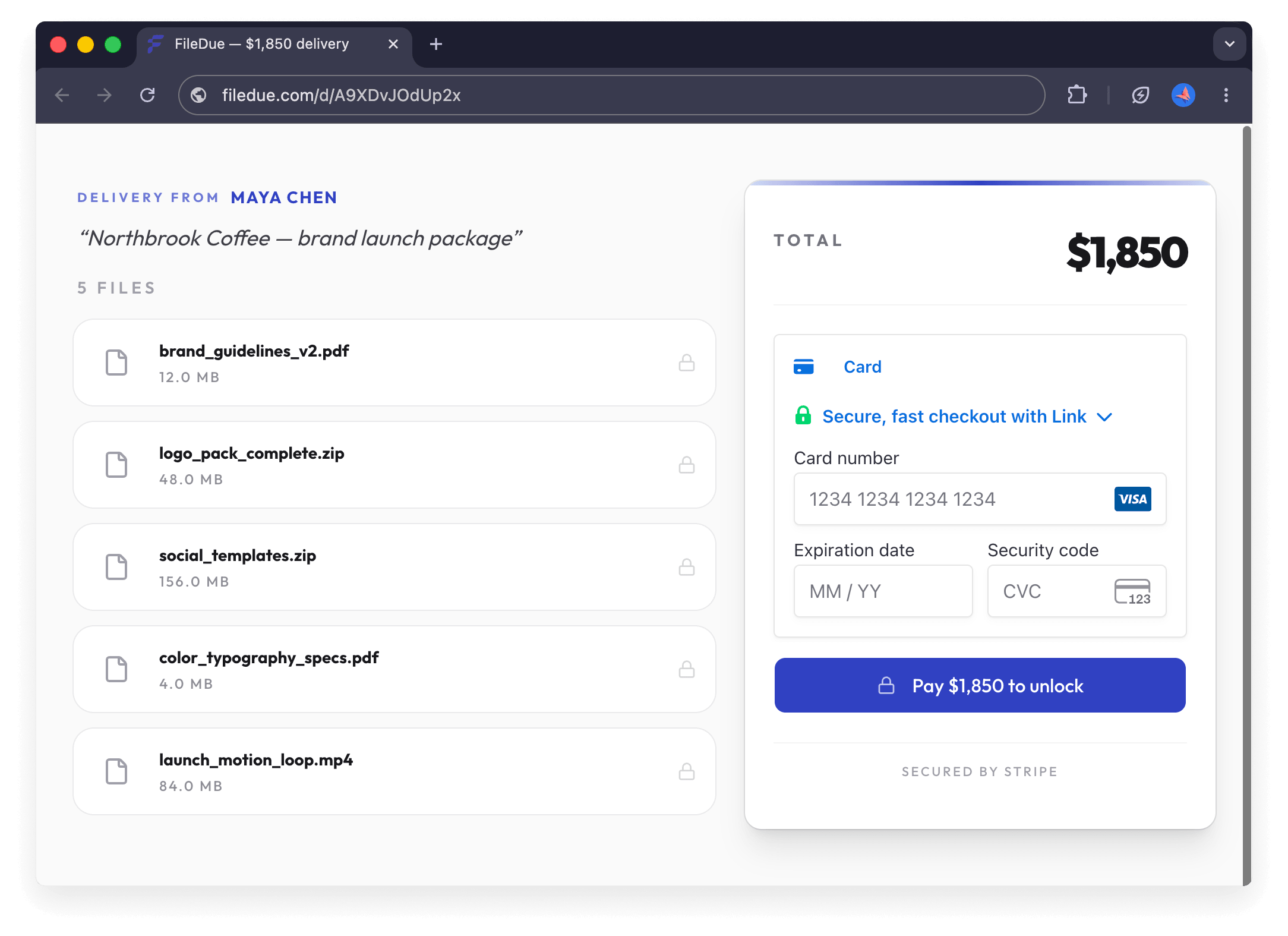
FileDue is not trying to be a faster WeTransfer. Most file-transfer tools focus on moving files. FileDue changes when the files unlock.
You upload your work, set a price, and share one link. Your client opens the link, sees the files and the price, pays through Stripe, and only then can download the files.
For freelancers who have been ghosted after sending final deliverables, this changes the dynamic. Payment happens at delivery instead of after delivery.
If a client does have your files and hasn't paid, the Final Payment Notice template and Client Ghosting Follow-Up give you the right words for that conversation.
The pricing model is different too: no subscription. First 3 paid links are free, then FileDue charges 2% per paid link. Money goes directly to your Stripe account. Clients do not need to create a FileDue account — they pay and download in one flow. If you’re comparing broader ways freelancers get paid — Stripe, PayPal, Wise, bank transfer, and FileDue — see the freelance payment methods comparison.
Best for: freelancers who deliver paid work to clients and want payment to happen before files unlock.
Not for: sharing files with friends, sending free deliverables, internal team handoffs, or general file transfer. For those, one of the tools above is a better fit. If the client already has your files and still hasn’t paid, this guide covers what to do when a client doesn’t pay.
Quick decision guide
If you just need a free WeTransfer replacement, Smash is the closest match.
If privacy matters more than branding, SwissTransfer has strong defaults and generous limits.
If you want branded delivery pages, TransferNow is one of the simpler options.
If you already pay for Dropbox, Dropbox Transfer is probably the least disruptive choice.
If you send huge video files, MASV is built for exactly that.
If you work in a regulated industry, Filemail is worth considering.
If your real problem is not transferring files, but getting paid before you hand them over, FileDue approaches the workflow from a different angle.
The bigger picture
WeTransfer changed because free file transfer is expensive to run at scale. Once a file-transfer service has tens of millions of users, the business model eventually has to push more people toward paid plans.
That does not mean every freelancer needs the same replacement.
Some people need a simple transfer link. Some need privacy. Some need branding. Some need speed for huge media files.
And some freelancers do not actually have a file-transfer problem at all. They have a payment-timing problem.
If you send a few files a month to clients you already trust, a free transfer tool may be enough. If you have been burned by sending finished work and waiting weeks to get paid, the better tool might not be another file-transfer app. It might be a way to make payment come before delivery.
FileDue works for any freelancer who delivers files — designers, developers, writers, photographers, video editors, and translators.